



As the digital attack surface continues to evolve, it’s crucial to stay ahead of the curve in terms of cybersecurity. That’s why we are excited to share with you the advancements we’ve made to our platform to better protect our customers from cyber threats. In this blog series, we will continuously highlight the newest features and updates that make the smarterSec Security Platform even more powerful for safeguarding your digital assets. From enhanced threat detection to improved user experience, our improvements will help our customers to stay one step ahead of potential security breaches. Whether you’re a current user or just interested in learning more about smarterSec, this blog series is for you. Your feedback is more than welcome. So, join us as we take a closer look at the latest innovations for the smarterSec Security Platform.
If you want to dive deeper into the functionalities of the smarterSec Security Platform, you can find more information here: smarterSec Security Platform
With release 5.4 we are giving you a cross-system view of your SAP security state. New views show which security notes are missing and how well your profile parameters comply, across all systems at once. Operating Systems join as a new target type, Jira tickets now follow each result variant, and the platform can carry your own branding, in light or dark mode.
New features & improvements
Main features
Missing Security Notes and Parameter Compliance across all systems
Which systems are still missing a security note? Where do profile parameters deviate from the recommended values? Until now, answering these questions meant going through results Testcase by Testcase and system by system.
With release 5.4, the new Missing Security Notes view shows which security notes are missing in which systems: one row per note, one column per system, with the number of open Findings per system. Each Finding appears only once, together with every affected system. You can switch between a matrix and a list, filter by environment and target, include exempted Findings and export the result. In addition, Testcase results now link directly to the related SAP security notes, so you get from the Finding to the fix in one click.
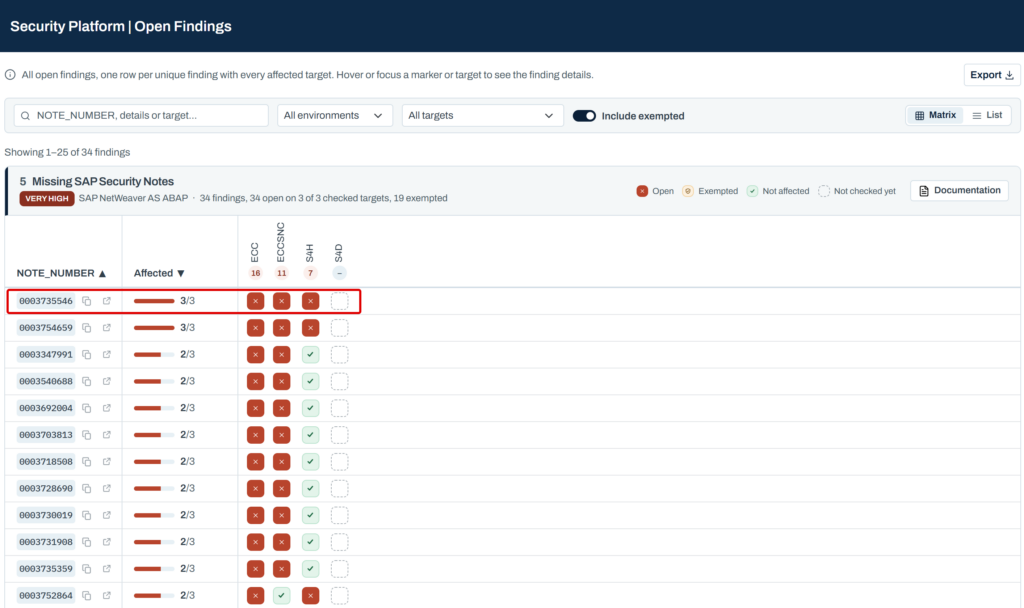
Screenshot S1: Missing Security Notes view with the open Findings per system
The new Parameter Compliance overview does the same for configuration, across all target types. For each profile parameter, it shows the recommended value from the smarterSec Testcases and their variants, the severity and how many systems are compliant, non-compliant or not yet checked. Expand a parameter to see the status per system, including its environment and when it was last checked.
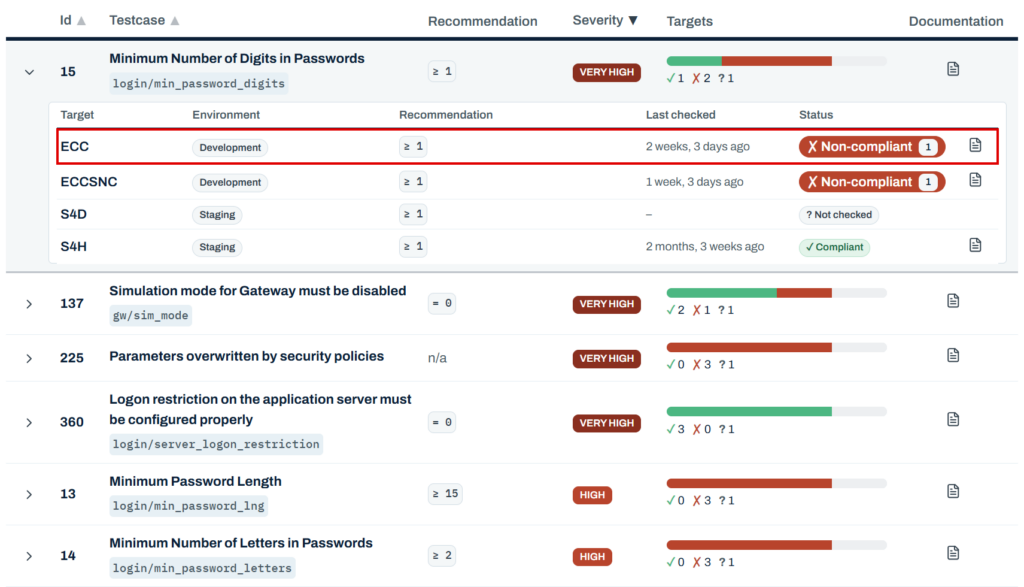
Screenshot S2: Parameter Compliance overview, expanded for one profile parameter
Automatic synchronization from SAP Solution Manager
Security notes and support packages can now be synchronized automatically from SAP Solution Manager. Testcases such as TC-5 (Missing SAP Security Notes) then no longer rely on the monthly content update alone, but receive current security note information from your own SAP Solution Manager.
No more missing an updated SAP Security Note or Hotfix in between the SAP Security Patch Days.
Operating Systems as a new target type
The security of an SAP system does not end at the application layer. With release 5.4, the smarterSec Security Platform fully supports Operating Systems as a new target type, starting with Debian-based Linux distributions and 11 new Testcases.
Why does this matter? Whoever gains access at operating system level can bypass many controls inside the SAP system. With the OS layer in the same platform as your SAP systems, you get one consistent view of Findings across both layers.
Jira tickets per result variant
The Jira integration now creates tickets per result variant instead of per Testcase and client. For SAP NetWeaver AS ABAP, a variant combines Testcase, system, client and technical key, for example a single Segregation of Duties (SoD) check or authorization check. Each ticket therefore covers exactly one issue type, which makes remediation easier to assign and track.
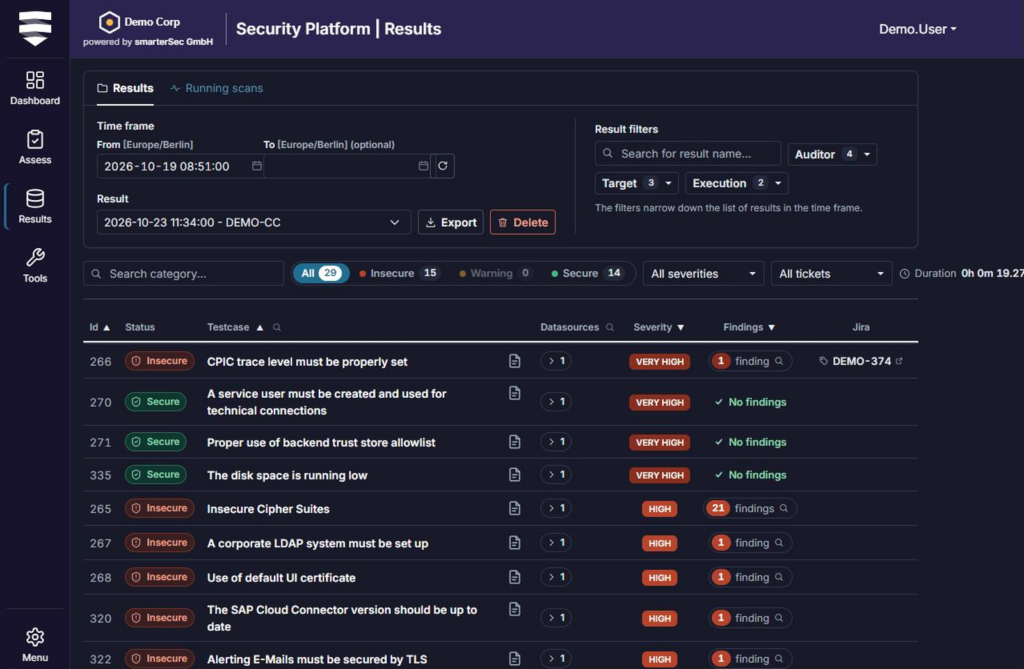
All tickets of a result can be viewed and opened directly from the result table. Once a result is compliant, its tickets can be closed right away, without switching between tools to clean up.
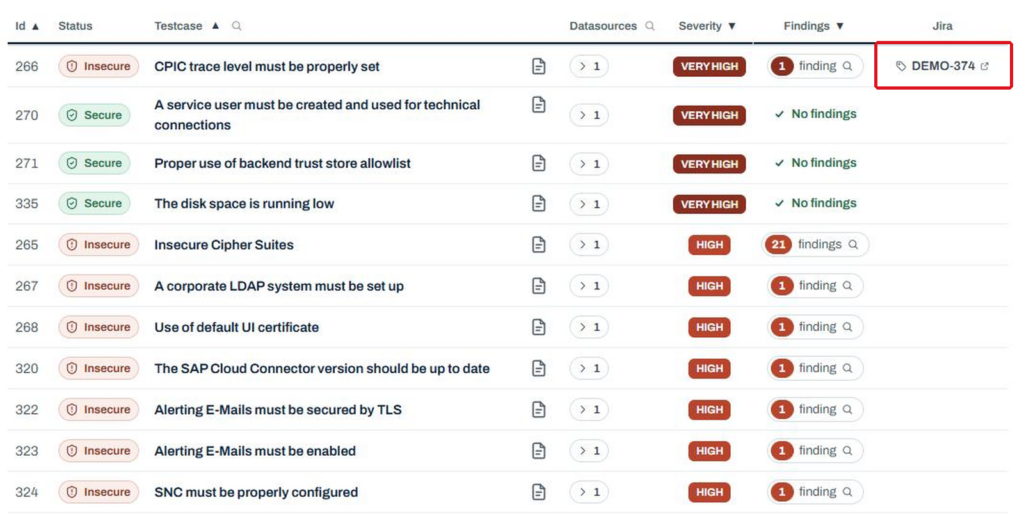
Screenshot S3: Result table with the linked Jira ticket of a result
Single sign-on with Microsoft Entra ID
Users can now sign in to the smarterSec Security Platform with Microsoft Entra ID. Single sign-on is an additional login option; the existing login remains available. It is set up in the settings together with your Entra ID administrator, and roles are still assigned exclusively in the platform, not via Entra ID. Your multi-factor authentication and Conditional Access policies from Entra ID apply at sign-in.
Why does this matter? Your users sign in with the corporate account they already use every day, without a separate password for the platform, and under the same security policies as everywhere else. At the same time, you keep full control over who sees what, because permissions stay in the platform.
Your branding, dark mode and a new look
The smarterSec Security Platform can now be branded with your own colors, font and logo in the settings. A live preview shows the result on desktop and phone width before anything goes live. Every color is checked for sufficient contrast, at least 3:1 for buttons, checkboxes, tabs and links and at least 4.5:1 for the navigation bar. Colors with too little contrast are rejected, and the platform suggests a readable shade instead.
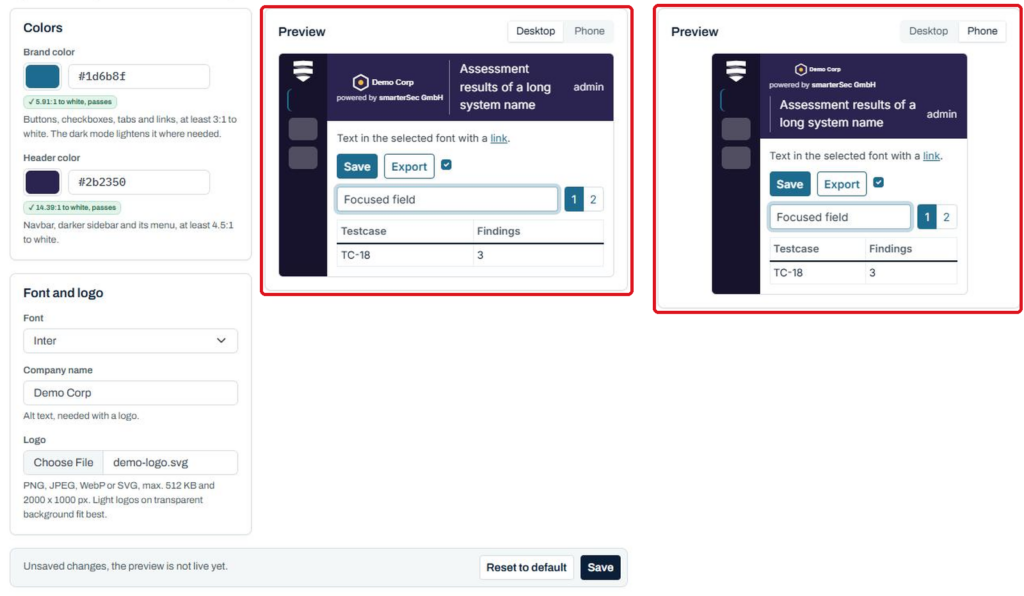
Screenshot S4: Branding settings with live preview on desktop and phone width
The new dark mode is switched in the user menu (top right – click your user name): light, dark or following system settings. The choice is remembered per browser. Branding colors are adjusted automatically so they stay readable in dark mode, and the dark backgrounds take on a tint of your branding colors.
Screenshot S5: Result view in dark mode with customer branding
At the same time, the platform now uses the new smarterSec corporate design: new logo, favicon and fonts, clearer severity and status colors that stay distinguishable in light and dark mode, consistent line icons and calmer, sentence-case labels. The login, maintenance and session-expired pages have been restyled as well, and the login page now shows your branding and logo.
Improvements & Fixes
- Resolving pseudonyms
– Users with the Pseudonym Resolver role can now resolve pseudonyms in a dedicated view, building on the pseudonymization introduced with release 5.3. - Preferred date and time format
– Each user can choose a date and time format in the user settings; tables, date fields, reports and email notifications follow it. - Exempted Findings at a glance
– The result table and the security state now show the number of exempted Findings per Testcase. - Integrations in the settings
– Solution Administrators can now configure the SIEM and Atlassian integrations, email delivery and global API keys directly in the settings. - SIEM integration: heartbeat, LEEF and CEF
– The SIEM integration can send a regular heartbeat event, so your SIEM can tell that the connection is alive, and now properly supports the LEEF and CEF formats. - Value Lists
– Value Lists can now import multiple other Value Lists. Large Value Lists load page by page and can be searched, filtered and sorted across all entries; only changed entries are saved, and all matching entries can be selected for deletion at once. The CSV import skips existing and invalid rows and shows a summary before adding the entries. - Scan Schedules
– Multiple Scan Schedules can now be activated or deactivated at once. - User administration
– Users can now be activated and deactivated in the user administration. - Shared credentials
– Shared credentials (one technical user per target system) can now be removed in the user settings. - Performance
– Dashboard, assessment cockpit, result view, security state and reports now load in around 30% of the previous time. The audit report takes about 50 seconds instead of about 420. - Fix – Saving Value Lists with expired entries
– Value Lists with expired entries can be saved again. - Fix – Actions after signing in again
– Actions on pages opened before signing in again now show a proper error message instead of an unclear “Invalid CSRF token” message.
Content
As always, we have updated all Testcases to check for the latest releases of components, kernels, and security patches for all available target types.
SAP NetWeaver AS ABAP
For this target type, we have added 1 new Testcase:
- TC-533 (Authorization)
Additionally, we have improved 3 Testcases:
- TC-18 (Authorization Check Framework):
25 NEW standard actions for Finance, Procurement, Sales and Materials Management. - TC-21 (Segregation of Duties):
42 NEW standard SoD checks covering the common SAP finance, procurement and sales risks. - TC-62:
The scan condition has been updated because the column has a different name on some SAP systems.
SAP BTP
For this target type, we have improved 2 Testcases:
- TC-529 & TC-530:
Adjustment of the scan condition resulting in better error handling.
Operating Systems
For this new target type, we start with 11 new Testcases for Debian-based Linux distributions.
We will update you on our new platform features regularly here in this blog – stay tuned and give us a follow on LinkedIn to not miss any further updates!
Related topics: Managed Security Service for the smarterSec Security Platform // smarterSec Security Platform