



As the digital attack surface continues to evolve, it’s crucial to stay ahead of the curve in terms of cybersecurity. That’s why we are excited to share with you the advancements we’ve made to our platform to better protect our customers from cyber threats. In this blog series, we will continuously highlight the newest features and updates that make the smarterSec Security Platform even more powerful for safeguarding your digital assets. From enhanced threat detection to improved user experience, our improvements will help our customers to stay one step ahead of potential security breaches. Whether you’re a current user or just interested in learning more about smarterSec, this blog series is for you. Your feedback is more than welcome. So, join us as we take a closer look at the latest innovations for the smarterSec Security Platform.
If you want to dive deeper into the functionalities of the smarterSec Security Platform, you can find more information here: smarterSec Security Platform
New features & improvements
Main features
Platform internal audit logging for seamless traceability of security relevant actions
With release 5.0, we’ve overhauled the internal audit logging for the smarterSec Security Platform. Every security-relevant action within the platform is now seamlessly being traced.
Why does this matter? A security platform holds a privileged position: it knows your vulnerabilities, your configurations, your weak spots. That makes it as well target for misuse. It is a tool that must be held to the same standards it enforces. With internal audit logging, every security relevant change / action within the platform is tracked. Who changed the scope of a scheduled scan? Who modified a Testcase configuration? Who adjusted user permissions? The platform now answers these questions itself.
This isn’t just about transparency. It’s about detecting potential misuse. If someone narrows a scan scope to hide a vulnerable system, or disables a critical Testcase, that action is being logged. With User-context, Timestamp, Source IP and before/after values.
API support
The internal audit log can be externally exposed via an API. If you want to provide the log data to your companies SIEM system or others you can do so. Please get in touch with us, in case you need some more information about the API and how to use it.
How to access?
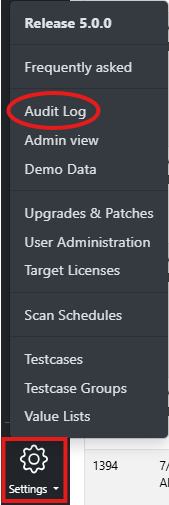
As soon as you do have the corresponding user role assigned to your user you can open the audit log by clicking: “Settings” -> “Audit Log”.
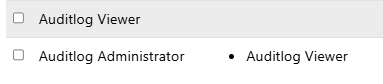
Two new roles have been added to the platform:
- Audit Log Viewer:
– Can only display the audit log - Audit Log Administrator:
– Can change settings within the audit log, like for example the audit log retention period
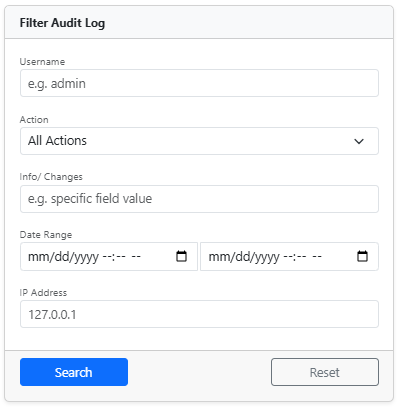
After accessing the audit log you will initially see all available events in the audit log. If you want to filter for some specific log events you can use the “Filter Audit Log” on the right side of the screen.
You can filter for username, actions, info / changes, date range and ip address.
An “Action” is a specific type of event: Created, Updated, Deleted, Accessed View or Login Attempts.
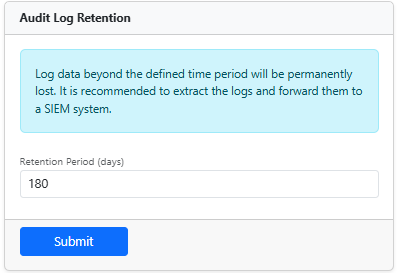
Also the “Log Retention” can be configured in case you do have the correct role assigned. Log retention is being configured in amount of days.
We have ensured, that the log can not be modified. However if someone still manages to modify the log by for example directly accessing the database, we can detect this behavior and will warn you. A “Log Integrity Check” is being executed to ensure the cryptographic log chain is fully intact. This detects historical modifications or any kind of deletions within the log.

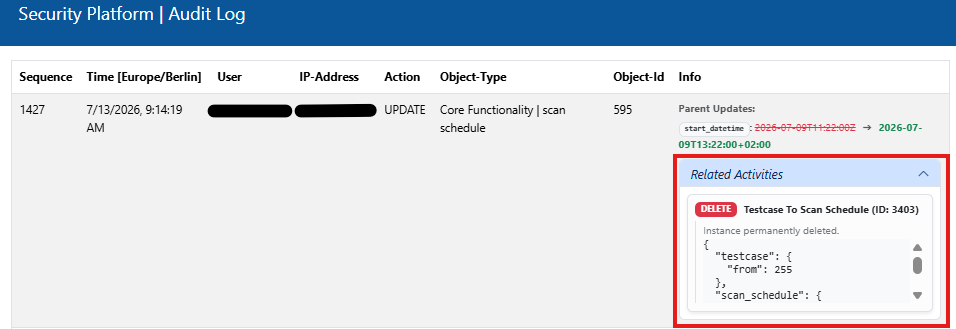
Each event will be shown with the following info: User, Timestamp, Action, Object-Type, Object-ID, Source IP and before/after values (info).
Improvements & Fixes
- Precise Inspection Timeframes for Log-based Testcases
– Log-based Testcases now display the exact timeframe they inspected, providing full transparency on the analyzed period. - SMTP Timeout Added to Prevent Assessments from getting stuck
– A new SMTP timeout ensures, assessments no longer are getting stuck when encountering closed ports. - Fix – Incorrect Maintenance Status on Inconsistent nginx Mappings
– An issue causing the maintenance status to be displayed as “finished” due to inconsistent nginx status mappings has been resolved.
Content
As always, we have updated all Testcases to check for the latest releases of components, kernels, and security patches for all available target types.
SAP SuccessFactors
For this target type, we implemented 5 new Testcases and updated 5 existing Testcases in the area of permissions and authorizations.
We will update you on our new platform features regularly here in this blog – stay tuned and give us a follow on LinkedIn to not miss any further updates!
Related topics: Managed Security Service for the smarterSec Security Platform // smarterSec Security Platform