



As the digital attack surface continues to evolve, it’s crucial to stay ahead of the curve in terms of cybersecurity. That’s why we are excited to share with you the advancements we’ve made to our platform to better protect our customers from cyber threats. In this blog series, we will continuously highlight the newest features and updates that make the smarterSec Security Platform even more powerful for safeguarding your digital assets. From enhanced threat detection to improved user experience, our improvements will help our customers to stay one step ahead of potential security breaches. Whether you’re a current user or just interested in learning more about smarterSec, this blog series is for you. Your feedback is more than welcome. So, join us as we take a closer look at the latest innovations for the smarterSec Security Platform.
If you want to dive deeper into the functionalities of the smarterSec Security Platform, you can find more information here: smarterSec Security Platform
New features & improvements
Main features
Major changes to underlying scanning database technology
With release 5.1 we have made changes to our underlying scanning database technology. This change is speeding up the analysis time of an assessment by up to 13x. With this massive gain, from now on, we have the possibility to introduce and execute more complex, correlated analysis within the smarterSec Security Platform. Another big benefit is the reduction of RAM overhead, saving resources operating the platform.
Possibility to stop running scans
Running scans can now be stopped in the “Running Scans”-tab within the result view.
To stop a running scan, select a scan by using the dropdown menu. Once a scan is selected, you can click the “Stop” button to end the scan immediately.

After the “Stop” button was clicked, the “Stop” button will be greyed out and the scan will be forced to being stopped. This is indicated by the text “Stopping” in the scan dropdown selection.

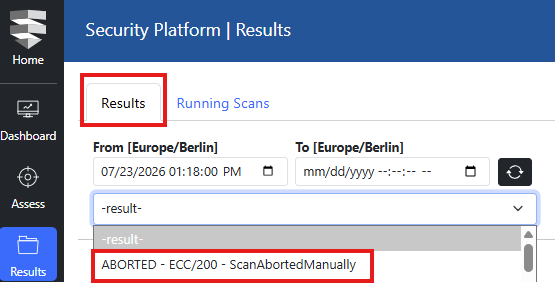
Already aborted scans can be found within the “Results” tab. In the dropdown, aborted scans will be indicated by the text “ABORTED” in the scan dropdown selection.
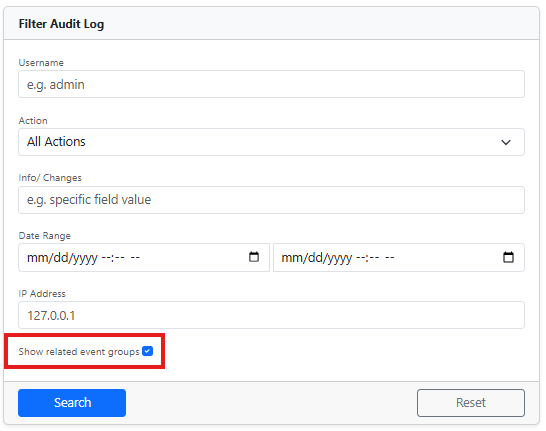
Added an optional filter to no longer group events in the audit log (also for the API retrieval)
Audit log events have been recently forced to be grouped together for chained events within so called “Batches”. We have now added a filter option within the Filter Audit Log to activate / deactivate the grouping. It is being reflected within the checkbox “Show related event groups”.
Improvements & Fixes
– Cached background tasks are now cleaned up faster, reducing unnecessary load and keeping the system lean.
– The audit log has been refined for better usability, making it easier to navigate and review logged activities.
– The result view is now pre-sorted by severity (descending) and finding count (descending), so the most critical findings appear first.
– Reports and result views now display infotype names and numbers instead of the underlying datasources, providing clearer and more meaningful context.
– A rare issue in the audit logging where Many-To-Many relations were not properly tracked has been resolved.
Content
As always, we have updated all Testcases to check for the latest releases of components, kernels, and security patches for all available target types.
SAP NetWeaver AS ABAP
For this target type, we implemented 2 new Testcase in the area of “System Security” & “Patch Management”. (TC-531 & TC-528)
SAP Business Technology Platform
For this target type, we implemented 2 new Testcase in the area of “Network Communication”. (TC-530 & TC-529)
We will update you on our new platform features regularly here in this blog – stay tuned and give us a follow on LinkedIn to not miss any further updates!
Related topics: Managed Security Service for the smarterSec Security Platform // smarterSec Security