



As the digital attack surface continues to evolve, it’s crucial to stay ahead of the curve in terms of cybersecurity. That’s why we are excited to share with you the advancements we’ve made to our platform to better protect our customers from cyber threats. In this blog series, we will continuously highlight the newest features and updates that make the smarterSec Security Platform even more powerful for safeguarding your digital assets. From enhanced threat detection to improved user experience, our improvements will help our customers to stay one step ahead of potential security breaches. Whether you’re a current user or just interested in learning more about smarterSec, this blog series is for you. Your feedback is more than welcome. So, join us as we take a closer look at the latest innovations for the smarterSec Security Platform.
If you want to dive deeper into the functionalities of the smarterSec Security Platform, you can find more information here: smarterSec Security Platform
New features & improvements
Main features
Add exemptions to value lists directly from result data
This change significantly simplifies the maintenance of value lists. By allowing exemptions to be added directly from the result data screen, the overall effort required to manage value lists is reduced. This enhancement eliminates the need to navigate back and forth between the result data screen and the value list itself, saving time and improving efficiency.
Because this functionality is highly sensitive and should only be used by authorized personnel, only users with the “Risk Manager” role are permitted to maintain value lists. Users without this role cannot make changes. Once a user is granted the “Risk Manager” role, they are authorized to maintain value lists and to add exemptions directly from the result data window.
After a Testcase is linked to a value list, entries can be added to the value list by right-clicking the relevant entry in the corresponding column of the result data window. In the example shown, the column “BNAME” has been configured in the value list as the column for which exemptions can be added.
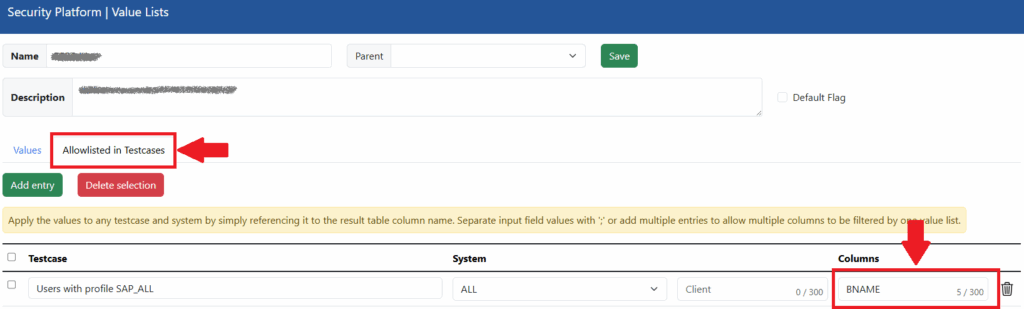
This is the value list configuration required to enable adding exemptions directly to its values from the “Show Data” window. The column “BNAME” is configured as the identifier for the value list.
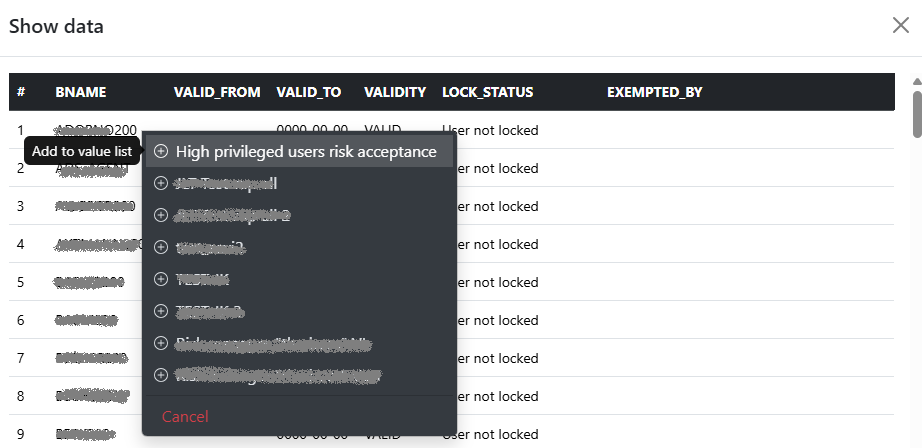
To open the popup for adding a specific “BNAME” to the allow list of the value list, right-click the value in the corresponding column. In this example, this is the “BNAME” column.

After selecting one or more value lists to which you want to add the entry, the exemption will be shown immediately in the “EXEMPTED_BY” column. You will also receive visual confirmation in the popup.
Custom dashboard filters preferences
We have introduced several new filter preferences that allow you to define a custom filter configuration for your dashboard. The selected default filter is automatically applied each time the user opens the dashboard.
The new filter options allow you to:
- Load the dashboard with no data (empty view)
- Group the Testcases (making it easier to identify trends, such as how many Testcases produce at least one finding)
- Filter by environment type
- Filter by solution type (target system)
- Define the duration used for the trend chart and delta calculation
- Set the default radar chart selection
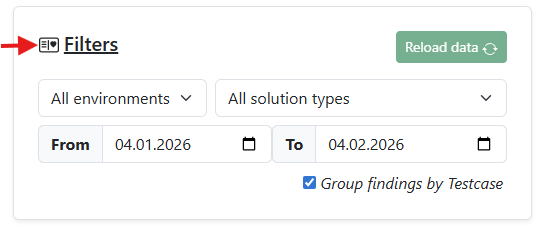
You can open “Filter Favorites” by clicking the icon next to “Filters” on the dashboard.
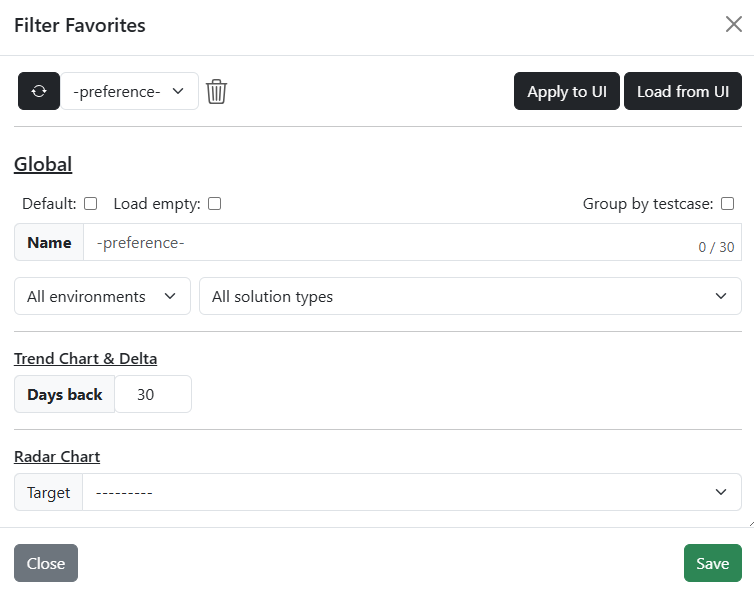
Here you can configure your filter preferences. You can save multiple filter variants and select the one you need at any time. When a filter variant is marked as “Default,” it will be loaded automatically each time you open the dashboard.
Improvements & Fixes
- Additional filter options for the assessment result page
– You can now filter by auditor and search by result name. - Movable and resizeable modal windows
– Modal windows can now be moved and resized to better support larger screens and allow more information to be viewed at once. - Updated password policy for new users
– The password policy for newly created user has been updated. - Comments for value list entries
– It is now possible to add a comment or reason to value list entries. - User roles dialog improvement
– The Save button for user roles has been moved to the modal footer. - Value list validation
– Self-referencing value lists can no longer be configured as their own parent. - Fix – ILM-Deletion Matrix generation:
– A rare issue that caused errors forHRP*tables in the ILM-Deletion Matrix
Content
As always, we have updated all Testcases to check for the latest releases of components, kernels, and security patches for all available target types.
SAP NetWeaver AS ABAP
For this target type, we improved 15 Testcases. Those changes were across the categories: Patch Management, User accounts, Critical standard users and Audit logging.
SAP Analytics Cloud
For this target type, we improved 3 Testcases. Those changes were across the categories: Roles, profiles & authorizations and User accounts.
We will update you on our new platform features regularly here in this blog – stay tuned and give us a follow on LinkedIn to not miss any further updates!
Related topics: Managed Security Service for the smarterSec Security Platform // smarterSec Security Platform