



In this blog post, we take a closer look at how SAP Unified Connectivity (UCON) strengthens system security while streamlining administrative processes. After introducing UCON as SAP’s security framework for RFC communication in our previous article, we now focus on practical tools and controls that make it effective in real-world environments.
Content
- What UCON Scenarios exist in SAP?
- Role Building Scenario
- HTTP Allowlist Scenario
- WebSocket RFC Scenario
- Secure-by-Default Logs: Automatic RFC and ICF Monitoring
- UCON Authorization Objects
- How can smarterSec provide support?
- Conclusion
What UCON scenarios exist in SAP?
In the previous blog we focused on the RFC Basic Scenario. However, SAP UCON provides additional scenarios that help that monitor and restrict how external systems interact with internal services and interfaces.
- RFC Basic Scenario: Logs and restricts which Remote Function Modules (RFMs) external systems are allowed to execute via RFC.
- Role Building Scenario: Extends the RFC scenario by aligning allowed RFC calls with specific users or roles to enforce more granular authorization control.
- HTTP Allowlist Scenario: Restricts inbound HTTP(S) access to explicitly approved ICF services such as OData, REST, or SOAP endpoints.
- WebSocket RFC Scenario: Controls and restricts WebSocket-based communication channels used for real-time integrations with SAP systems.
Role Building Scenario
The role building tool provides a structured way to analyze and organize the RFMs used within a system. To identify the RFMs currently in use, the logging phase must first be activated in the UCON Cockpit (see UCON setup). During this phase, all RFC calls are recorded.
The logged RFMs can then be reviewed in the Role Building Scenario, where they can be assigned to Communication Assemblies (CAs). CAs are UCON objects that group RFMs with similar functional or security characteristics.
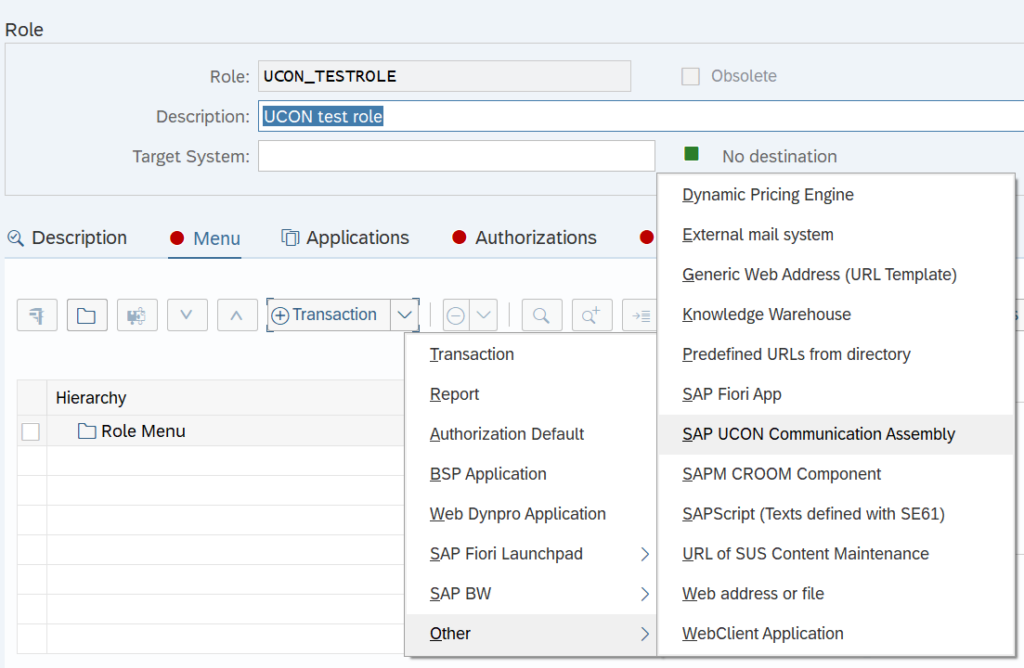
Once created, these CAs can be integrated into authorization roles using transaction PFCG, allowing administrators to align RFC access with the system’s role-based authorization model.
How to create Communication Assemblies (CAs)?
It is important to understand how CAs and authorization roles work together in UCON to provide structured, role-based control over external RFC access.

- Select relevant function modules
- Goal: Identify the relevant RFMs being called in your system.
- Benefit: Helps to avoid over-provisioning of roles by excluding unused or obsolete functions.
- Assign function modules to CA
- Goal: Group related RFMs to simplify access management.
- Benefit: Makes allowlist management more scalable and maintainable.
- Assign CAs to Roles
- Goal: Have the RFMs which are assigned to CAs be added to authorization roles (see screenshot below).
- Benefit: Enhances compliance by aligning technical configurations with role-based access control (RBAC).
For more detailed information, see Using Role Builder.
HTTP Allowlist Scenario
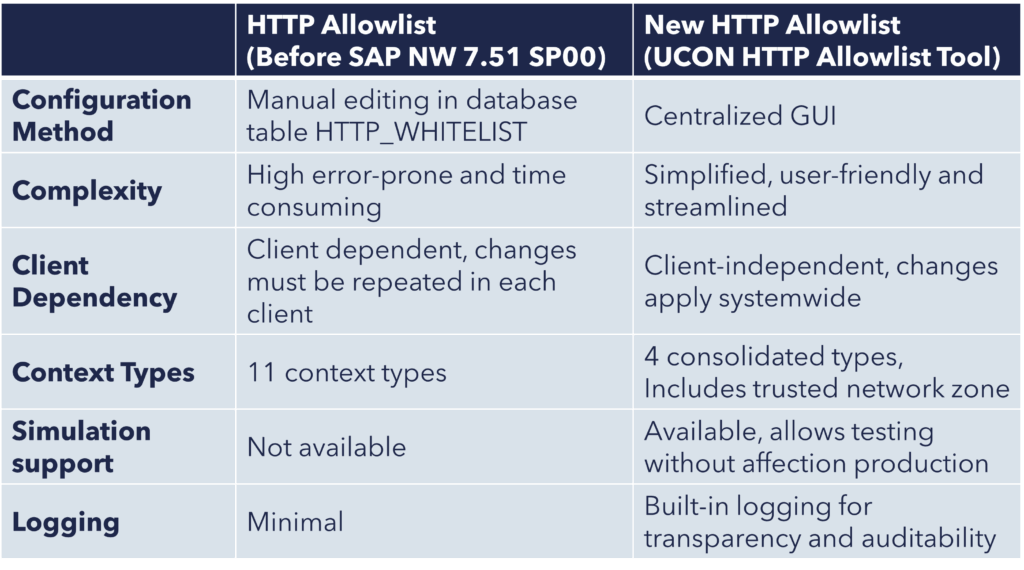
Controlling which external URLs are allowed to interact with your SAP system is an important aspect of securing your system landscape. The UCON HTTP Allowlist provides centralized control over which HTTP(S) calls are permitted for different functional areas, such as redirects, clickjacking protection, or the loading of CSS stylesheets.
To access and manage the HTTP Allowlist, open the UCON Cockpit (transaction UCONCOCKPIT) and select the HTTP Allowlist Scenario.
How to establish an HTTP Allowlist?
Implementing an HTTP allowlist in your SAP system using the UCON framework is a structured process that helps ensure security without disrupting functionality.
1. Logging Phase
In the first phase, all HTTP(S) calls are allowed. The purpose here is to observe and log the full scope of HTTP traffic across different functional areas without interfering with any activity. This phase gives you visibility into which external URLs your system is interacting with.
- Goal: Capture all HTTP(S) calls made in the system.
- Benefit: Overview of all HTTP calls made by the system.
2. Build the Allowlist
Using the data collected during the logging phase, you begin to add the relevant URLs to the allowlist for each context type. The tool helps you identify frequent or critical calls and allows you to define exactly which ones should be permitted in the future.
- Goal: Define trusted URLs per context type.
- Benefit: Easy way to build URLs that are necessary for core system functions, integrations or third-party services.
3. Simulation Phase
Once the allowlist is in place, you switch to the simulation phase. In this phase, all HTTP calls are still allowed, just like in the logging phase. However, the system now shows which HTTP calls would have been allowed or rejected based on your current allowlist configuration.
- Goal: Verify that your allowlist covers all necessary use cases without causing disruptions.
- Benefit: Missing entries are identified and the allowlist can be adjusted before enforcement.
4. Active Check Phase
After verifying the allowlist through simulation, you can move into the active check phase. At this point, the allowlist becomes fully enforced. Only HTTP calls to URLs on the allowlist are allowed, and all others are rejected.
- Goal: Enforce security by strictly controlling HTTP(S) communication.
- Benefit: Unauthorized HTTP calls will be blocked automatically.
For further Information about how to maintain HTTP Allowlists see the SAP documentations:
WebScocket RFC Scenario
As system landscapes become more distributed and cloud-connected, the need for flexible, secure, and efficient remote communication is more important than ever. Traditional RFC communication in SAP systems relies on the CPI-C interface and typically requires components like SAProuter and Gateway, often coupled with VPN connections for cross-network communication.
To address these limitations, SAP offers RFC over WebSocket a modern alternative that uses HTTP and WebSocket protocols for remote-enabled function calls. By defining an RFC destination with connection type “W”, you can initiate RFC communication over HTTP/WebSocket without relying on legacy infrastructure.
Benefits at a glance:
- Eliminates dependency on SAProuter and CPI-C
- Uses modern HTTP infrastructure and supports HTTP/2 multiplexing
- Always encrypted via SSL
- Seamlessly integrated with UCON allowlists
1. Activate UCON WebSocket RFC permanently (productive use):
- Call transaction RZ10.
- Select the profile for which the change shall be made.
- Under “Edit Profile” select “Extended maintenance” and click “Change”.
- Check if the parameter “ucon/websocketrfc/active” and “rfc/websocket/external_active” are already listed.
- If so, then change then set the value of parameter “ucon/websocketrfc/active” to “1” (default: active) and the value of “rfc/websocket/external_active” to “2” (default: only allow if UCON is active).
If not, press “F5” to create a new parameter with said value. - To save your changes, go back until you get to the screen “Edit Profiles”, then click “Save”.
2. Configuration in UCONCOCKPIT
- Go to “More” → “Operations” → “Unified Conn. Setup WebSocket RFC”.
- Decide whether to use shared or dedicated Communication Assemblies.
- Select between transportable (recommended: Z/Y namespace) or local object.
- Choose if the allowlist is client-specific or cross-client.
3. Maintain the Allowlist
- Use the WebSocket RFC Scenario editor in UCONCOCKPIT to add RFMs.
- Optionally move blocked RFMs (logged by default) directly into the allowlist.
- Save and activate the allowlist for enforcement.
WebSocket RFC also supports latency-based compression settings, with a default WAN threshold of 110ms (controlled via “rfc/websocket/wan_latency_bound”), ensuring performance is optimized for WAN or LAN scenarios.
For further Information about how to maintain WebSocket RFC, see the SAP documentation:
Secure-by-Default Logs: Automatic RFC and ICF Monitoring
SAP’s Secure by Default is a security approach introduced to enhance system protection by enabling key safeguards automatically, without requiring manual configuration.
In our previous blog post on UCON, we explained how administrators can enable logging to collect RFC and ICF usage data before activating restrictions. These logs are essential for identifying which interfaces are actually used and for building the allowlists required by UCON scenarios.
Starting with SAP S/4HANA 2022, SAP introduced an additional mechanism as part of the Secure by Default initiative: Secure-by-Default Logs. With this feature, all RFC calls (including WebSocket RFC) and ICF service accesses are automatically recorded, even before UCON logging is explicitly configured.
Key Features and Benefits
- Auto-logging starts post-installation or upgrade.
- Useful for pre-UCON analysis and later migration to UCON.
- Enables transparent monitoring.
How to access the logs?
Use transaction SBDLOG and select the scenario:
- Remote Function Calls (refers to UCONPHTL if UCON is active)
- WebSocket RFC (viewable even if UCON is active)
- Internet Communication Log (ICF logs)
How to migrate the Secure-by-Default Logs to UCON?
In transaction UCONCOCKPIT:
- Go to “Operations” → “Unified Connect.: Setup RFC Basis”
- Choose “Pull Data from Secure-by-Default Logging” to migrate RFC data to UCON
UCON Authorization Objects
When using the UCON tools, proper authorization management is essential. The most relevant authorization objects for controlling the different functionalities are listed below:
- S_UCON_ADM (UCON Administration Authorization)
- S_UCON_WAD (HTTP Allowlist Administration Tables)
- S_UCON_WHI (HTTP Allowlist Tables)
- S_UCON_WST (HTTP Allowlist Setup Table)
Depending on the system landscape and administrative responsibilities, these authorization objects should be assigned according to the principle of least privilege.
How can smarterSec provide support?
Our smarterSec Security Platform (SSP) checks your UCON configurations, analyzes your logs for potential threats and scans for SAP Notes that are not implemented yet. Additionally we offer SAP Security Risk Assessments which is a quick and easy way to efficiently analyze the current security and compliance level of your SAP systems and have it assessed by our experienced SAP Security & Compliance experts.
Conclusion
The UCON framework is a key component of a secure-by-default architecture for modern SAP landscapes. By actively managing RFC, HTTP, and WebSocket communications, UCON enables organizations to move from open communication models to controlled, policy-driven access without disrupting legitimate integrations.
With its built-in tools, UCON enables administrators to manage HTTP allowlists, simulate UCON restrictions, and analyze interface usage through logging, providing the visibility needed to safely implement communication controls.
By controlling and restricting RFC-based communication between systems and users, SAP UCON significantly reduces the attack surface at the application layer.
To further strengthen the overall security posture of an SAP landscape, it is equally important to secure communication at the network layer. Our blog post Why SAProuter Security Matters More Than Ever explains how SAProuter acts as a controlled gateway between SAP systems and external networks.
Together, these mechanisms help establish a layered security approach that protects SAP systems from both application-level and network-level threats.