



In our previous blogs about USR02, we covered the fundamentals of table USR02 and took a deeper look at how password hashing is handled in SAP systems. One major question, however, remains unanswered in many system landscapes: why do so many users have direct access to USR02 at all?
Despite its criticality, we frequently encounter productive systems where access to USR02 is widely assigned and often without a clear business justification. Typical use cases include checking lock status or basic user information, even though transactions such as SU01 or SUIM already provide this functionality in a controlled way.
When confronted, the responses are often similar: “Why do I even have this access?” or “How should I know which tables are critical?” These are not individual mistakes, but symptoms of missing authorization governance.
In this blog, we focus on the practical cleanup of roles providing access to USR02 using transaction PFCGMASSVAL. We show how to identify affected roles, define appropriate authorization values for S_TABU_DIS and S_TABU_NAM, safely simulate changes, and finally enforce them at scale.
Table of Content
- What is transaction PFCGMASSVAL?
- How to access USR02 and what is recommended?
- How to clean up roles with access to USR02 using PFCGMASSVAL?
- How can smarterSec provide support?
- Conclusion
What is transaction PFCGMASSVAL?
The transaction PFCGMASSVAL is designed for mass maintenance of authorization data in roles within the SAP system. This allows the configuration of a single authorization object to be applied across multiple roles at once, effectively extending the functionality of the standard role maintenance transaction PFCG. Updating these roles individually in PFCG would be inefficient and error-prone.
What is PFCGMASSVAL capable of?
Generally, the transaction can perform various changes on a selected set of roles (mass changes).
The main types of field changes are as follows:
- Authorization Object: Change an specific authorization object and its fields. All roles having the object are updated with the new values of the authorization object.
- Authorization Field (Cross-Object): Change the value of an authorization field. All authorization objects having this field included get updated with the value.
- Manual Changes: Add or delete authorization objects, activate or deactivate one authorization object.

PFCGMASSVAL Execution Modes
The transaction provides three modes that can be used to implement the role changes.
SAP recommends, in SAP Note 2324041, simulating all intended changes before executing mass updates to roles. This allows the planned adjustments to be reviewed in advance and ensures that only correct and desired changes are implemented.
How to access USR02 and what is recommended?
Access is controlled by the authorization objects S_TABU_DIS and S_TABU_NAM, using the relevant fields DICEBERCLS (Table Authorization Group) and TABLE (Table Name).
When determining which values should be maintained for the table name and table authorization group, two aspects must be considered:
- The table USR02 itself and its authorization group should not be maintained in any role (except read access in SAP administrator roles). The default authorization group for table USR02 in older ECC systems is SC and in S/4HANA it is SPWD.
- The field TABLE should be maintained as granularly as possible and include only explicitly allowed tables. Only the activities that are strictly required should be assigned.
The first aspect is universal and defines which values should not be included. The second aspect concerns which values must be included and is therefore customer-specific. Complete removal may be possible in some cases, but the role may still require access to a limited range of tables.
How to clean up roles with access to USR02 using PFCGMASSVAL?
The objective now is to use the transaction PFCGMASSVAL to restrict role-based access to table USR02 by adjusting the relevant authorization object values within the affected roles.
The clean up process is following these steps:
- Identify Roles
- Role Back Up
- Configuration
- Simulation
- Execution
Identify Roles with Access to USR02
Now that we have identified S_TABU_DIS and S_TABU_NAM as the authorization objects relevant for restricting access to table USR02, we can now analyze which SAP roles include these authorizations. It is possible to directly start with the transaction PFCGMASSVAL to search for roles based on authorization objects. Alternatively, you can use the SUIM transaction.
To identify the roles, follow these steps:
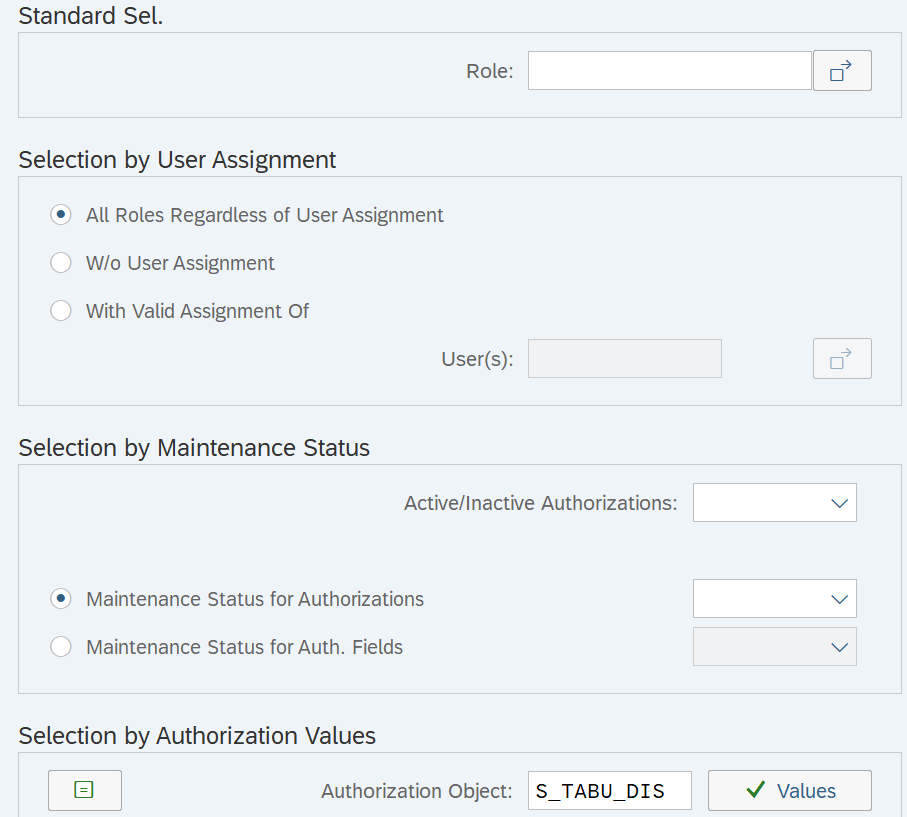
- Execute transaction PFCGMASSVAL.
- Click on “Roles with Authorization Data”.
- Under “Selection by Authorization Values” insert the authorization object S_TABU_DIS (or S_TABU_NAM) with the corresponding values and click on “Execute”.
- S_TABU_DIS: DICBERCLS = “SPWD”
- S_TABU_NAM: TABLE= “USR02”
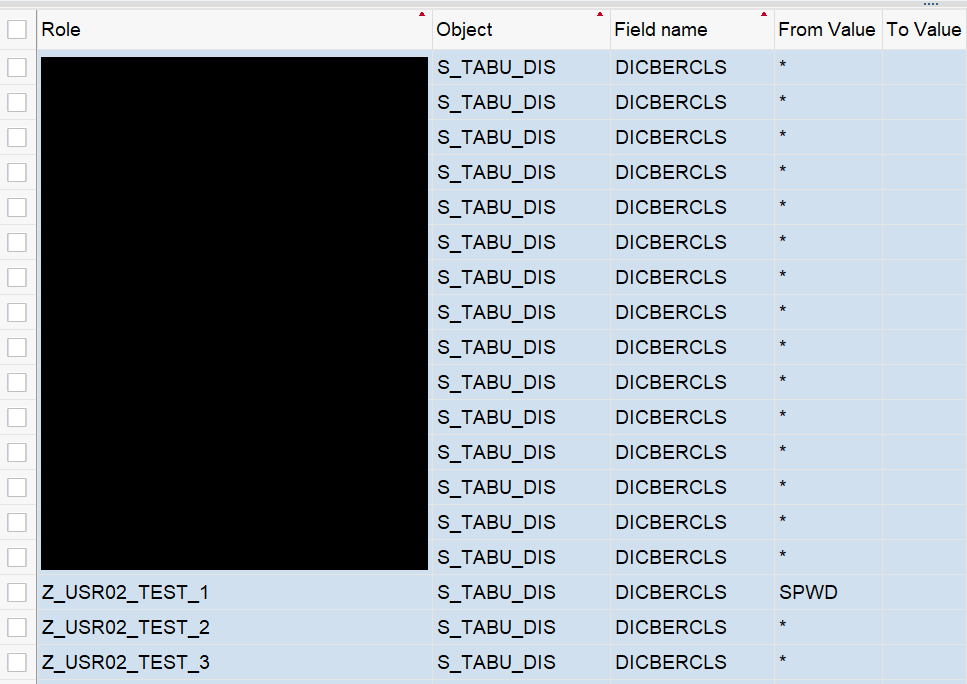
- As a result, all roles are displayed based on the provided summary.
- Select the roles you want to maintain and click on “Transfer”.
Ensuring Role Backup prior to Update
Before making mass changes to roles, it is strongly recommended to back them up. To do so, execute the following steps:
- Enter transaction PFCG.
- Click on “More” > “Utilities” > “Mass Download”.
- Insert the selection of roles and click on “Execute”.
- After setting the filename and path, click on “Save”.
- Click on “Allow” to give SAP permission to create the directory and file (in case you are asked via pop-up).
Configurations in PFCGMASSVAL
After the roles are backed up, the actual mitigation can begin. In our scenario, the following roles have been identified to grant access to USR02 and therefore should be maintained:
- Z_USR02_TEST_1:
- S_TABU_DIS, DICBERCLS = BAF4, SPWD, …
- S_TABU_NAM, TABLE = USR02, …
- Z_USR02_TEST_2:
- S_TABU_DIS, DICBERCLS = *
- S_TABU_NAM, TABLE = *
- Z_USR02_TEST_3:
- S_TABU_DIS, DICBERCLS = *
- S_TABU_NAM, TABLE = USR02, …
Make sure to select “Execute with prior simulation” before proceeding.

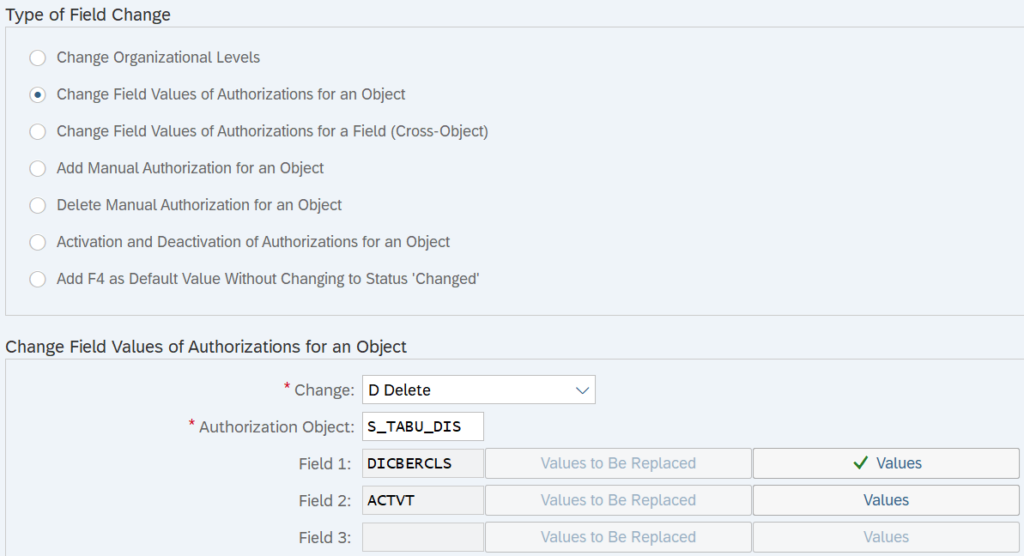
In our example, we remove the table authorization group SPWD from S_TABU_DIS and the table USR02 from S_TABU_NAM. Since authorizations may also be granted via the wildcard value (*), this value is removed from both authorization objects as well.
It is important to note that removing the wildcard (*) also eliminates access to all other tables and table authorization groups. This approach is used here for simplicity but in a real-world scenario, alternative authorization values should be carefully evaluated and discussed. In general, granting “all” permissions within an authorization object is not recommended.
Add the authorization object and its values that are to be deleted or changed. The selection will look similar to the screen below. Once the configuration is complete, click on “Execute” to proceed.
Simulation
Within the simulation mode it is important to review the effect of the changes made. Back up your roles by clicking on “Old Values” if you haven’t done so already.

The deletion of table authorization group SPWD from role Z_USR02_TEST_1 is marked by the minus symbol. The activities are unaffected by this change as well as the access to table authorization group SPWD by the wildcard (*). To simulate the removal of the asterisks from the object and thus the access to table authorization group SPWD, the transaction has to be rerun.
In the next scenario, we selected “Replace” rather than “Delete” to remove the wildcard from the roles and assign the table authorization groups BAF4, BAST and KCA instead. The simulation will look as follows:
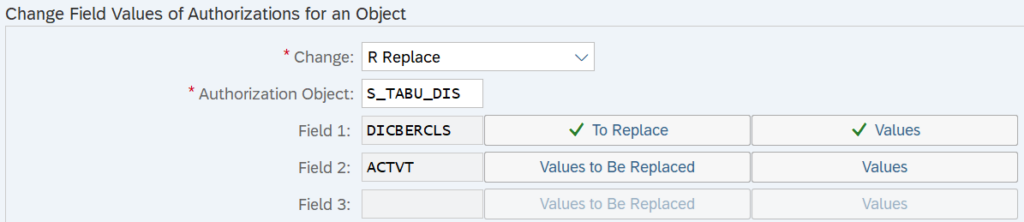
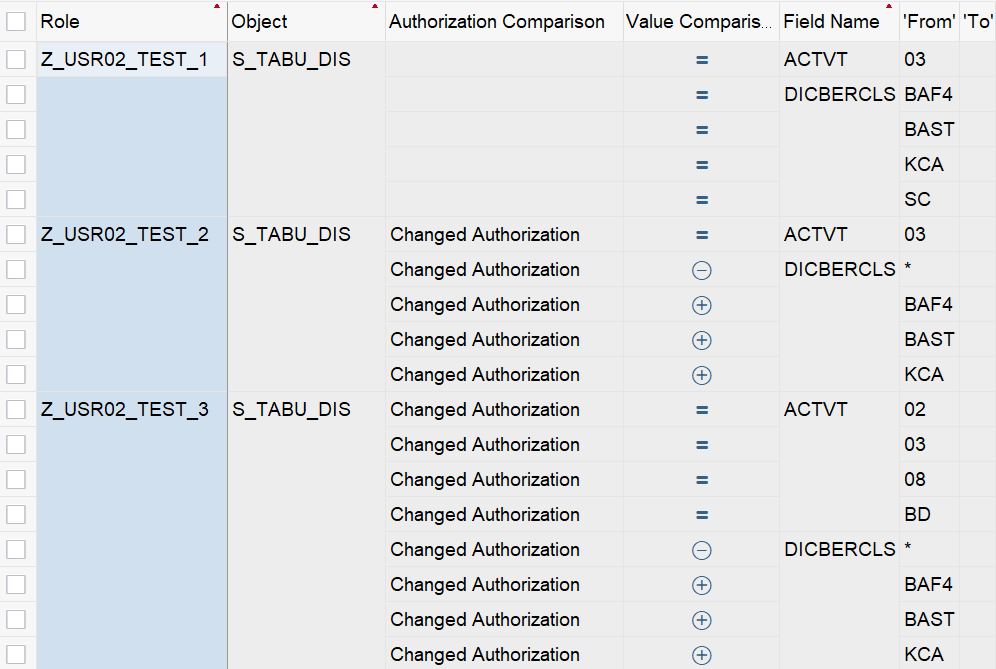
Changes to the authorization object S_TABU_NAM follow a similar approach. Instead of table authorization groups, table names must be maintained. For example, table USR02 and * must be replaced for the field TABLE.
After reviewing the effects in the simulation, process by clicking on “Execute” (F8).
Execution
The result shows which roles were updated and which remained unaffected. In this example, only role Z_USER02_TEST_1 is affected by the removal of the table authorization group SPWD.

At this stage, it is possible to manually review and adjust the authorizations in the corresponding roles to confirm the changes. As shown in the screenshot below, the table authorization group SPWD is no longer present, indicating that the operation was successful.
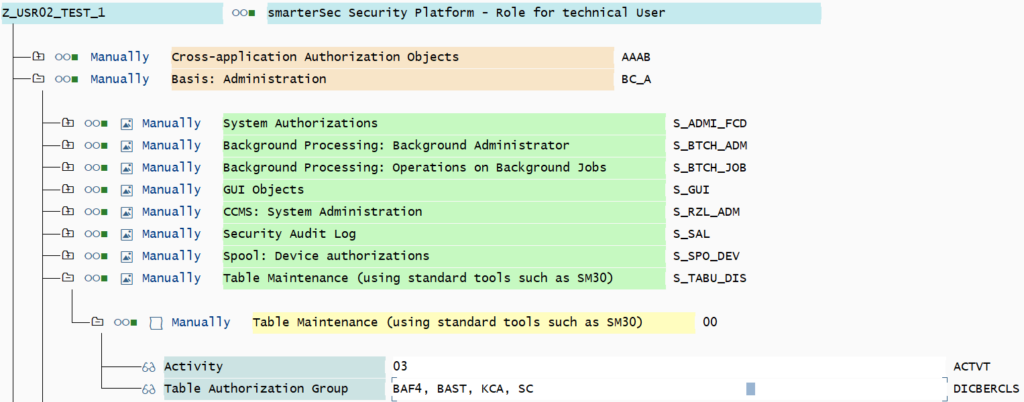
Upon reviewing the role, it becomes apparent that the generated profiles are not up to date. To finalize the changes, regenerate the profiles. The results for the removal of the asterisks will look similar.
Wrap-up
In our scenario, after executing the transaction PFCGMASSVAL four times, the access to USR02 was removed. It was necessary to remove the asterisks as well as the specific values (SPWD, USR02) from each authorization object.
While this may seem tedious for only three roles that could easily be changed manually, it makes sense if the number of roles with the same authorization properties increases.
How can smarterSec provide support?
The smarterSec Security Platform enables organizations to monitor your SAP landscape and identify users who have access to critical tables such as USR02.
In addition, our in-house SAP_ALL Reduction Tool enables you to analyze actual user activity and deriving streamlined roles based on real usage patterns. This ensures that users retain only the permissions they truly require, significantly reducing unnecessary access.
Protecting highly sensitive tables like USR02 often requires adjustments to established processes, particularly where direct table access has traditionally been used. As these legacy approaches are phased out, smarterSec supports you with expert SAP security consulting services, drawing on extensive experience to recommend secure and practical alternatives for tasks that were previously performed via direct access to USR02.
Conclusion
Maintaining access to USR02 is a critical step toward stronger SAP authorization governance. With transaction PFCGMASSVAL, roles can be analyzed and adjusted efficiently, even at scale. By removing unnecessary privileges, organizations significantly reduce risk and ensure that access to sensitive tables such as USR02 is strictly limited to what is truly required.
At smarterSec, we support this journey with the smarterSec Security Platform and expert consulting services. We help organizations remediate existing risks and establish sustainable and transparent authorization concepts for the future.
Further Blogs & References